
- What Is Clash Detection In BIM?
- The Four Types Of Clashes In BIM
- How Does Clash Detection Work? The Step-By-Step Process
- Clash Detection Software: Which Tools Are Used?
- What Does Clash Detection Actually Save? The Cost Case
- Which Construction Projects Benefit Most From Clash Detection?
- Clash Detection VS Coordination: What Is The Difference?
- In-House Clash Detection VS Offshore BIM Coordination
- Need Clash Detection And BIM Coordination For Your Next Project?
- FAQs
Every project starts with potential issues that teams need to address. The architect’s wall sits where the structural engineer put a beam. The MEP contractor’s duct run collides with the sprinkler system. The electrical cable tray runs through the area needed to access the air handling unit.
Under the traditional 2D documentation system, subcontractors usually identify coordination problems on-site and then submit an RFI to resolve them. The cost of resolving a coordination issue on-site may be up to 100 times more than resolving the issue in the design model.
Clash detection in BIM prevents this. Clash detection enables early identification and resolution of coordination problems on the construction project.
What Is Clash Detection In BIM?
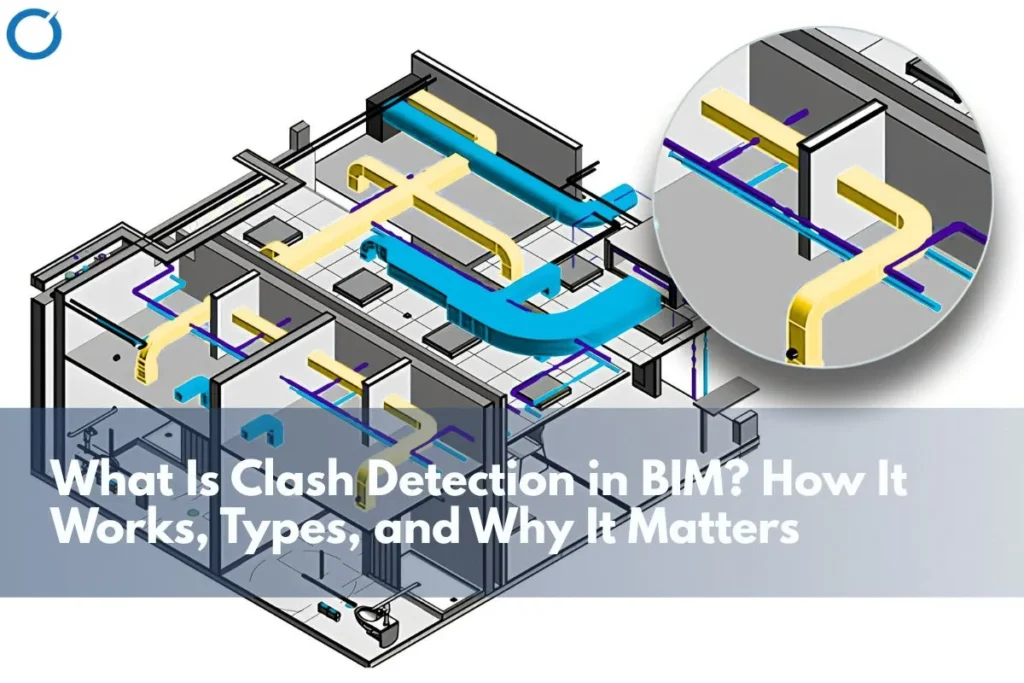
Clash detection is an automated approach of superimposing different BIM models of several disciplines, architecture, structure, mechanics, electricity, plumbing, and civil engineering on top of one another and then running software analysis to find all physical clashes among building components.
Clash detection starts with accurate BIM modeling services, where architectural, structural, and MEP models are developed with enough detail to support coordination, review, and construction planning.
The output of this approach is a clash report, a detailed description of all detected clashes sorted according to their type and severity, as well as their accurate location within the 3D model. Teams then resolve each conflict and create construction drawings from the coordinated, clash-free model.
The primary difference from manual coordination is automation and exhaustiveness. A trained coordinator manually overlaying 2D drawings can identify obvious conflicts but will miss conflicts that are only visible in three dimensions, or that occur in complex, layered MEP zones where dozens of systems intersect. Clash detection software identifies every conflict, systematically, across the entire model.
Industry data: Research published in the Journal of Construction in Developing Countries (2025) found that resolving clashes identified through BIM clash detection prevented substantial budget overruns on case study projects with identified clashes requiring significantly less cost to resolve in the model than equivalent issues discovered on site. Separately, a detailed ROI case study by the Design-Build Institute of America (DBIA) on a $230 million food processing project found that BIM coordination and clash detection delivered measurable, quantifiable savings across the project.
The Four Types Of Clashes In BIM
Not all conflicts have the same root causes. BIM conflict resolution falls into four categories, each with its own characteristics and resolution methods.
| Type | Definition | Common Example | On-site Risk if Missed |
|---|---|---|---|
| Hard Clash | Two elements physically occupy the same space | HVAC duct runs through a structural beam | Immediate stoppage, cutting and re-routing on site |
| Soft Clash | Elements are within an unacceptable proximity, no contact, but clearance was violated | Pipe runs within 50mm of a high-voltage cable tray | Safety violation, maintenance access problem |
| Workflow Clash | Scheduling conflict: Two trades need the same space at the same time | Electricians and plumbers are both scheduled for the same zone on the same day | Programme delay, subcontractor standoffs |
| Clearance Clash | Insufficient space for maintenance access, regulatory clearance, or equipment removal | No access route for replacing a rooftop unit | Building code violation, costly retrofit |
Which Clash Type Causes The Most Damage On-Site?
The hard clash is the easiest one to recognise because it refers to situations where elements physically can’t fit within one place, but its resolution requires immediate attention. However, soft clashes and clearance clashes prove to be more costly since they are difficult to detect, thus making their recognition occur only during a maintenance task or safety inspection several years down the road after project completion.
Teams now incorporate workflow and scheduling clashes into 4D BIM sequencing to detect programmatic conflicts before construction begins.
How Does Clash Detection Work? The Step-By-Step Process
Clash detection is not a singular act but rather a systematic approach that takes place throughout the pre-construction stage. Let us have an insight into the process.
| Step | Action | Tools Used | Output |
|---|---|---|---|
| 1 | Model preparation | Autodesk Revit, ArchiCAD, Tekla | Individual discipline models architectural, structural, MEP, cleaned and ready for coordination |
| 2 | Federated model assembly | Autodesk Navisworks, BIM 360 / ACC | All discipline models linked in a single coordinated environment |
| 3 | Automated clash detection run | Navisworks Clash Detective, Solibri | Clash report listing every conflict by type, location, and severity |
| 4 | Clash triage and prioritisation | Issue management platform (Newforma, BIM Track) | Clashes categorised as critical, major, or minor; resolution ownership assigned |
| 5 | Resolution and model update | Revit, ArchiCAD, Tekla | Discipline models updated, clashes resolved, re-run confirms clearance |
| 6 | Construction documentation | Navisworks, Revit | Shop drawings, coordination drawings, and setting-out information extracted from the clash-free model |
Once the model reaches a coordinated stage, accurate construction documentation services help convert the resolved BIM model into shop drawings, coordination drawings, and project-ready documentation.
How Many Clashes Are Typical On A Construction Project?
The number of clashes identified varies enormously by project type and size. A straightforward commercial fit-out may produce 50-200 clashes. A complex hospital, data centre, or industrial facility with dense, overlapping MEP systems can produce thousands, the majority of which are hard or soft clashes between MEP components.
What matters is not the number of clashes but the resolution rate before construction begins. A project that finds 500 conflicts and solves them all in preconstruction will be in much better shape than one that identifies 50 conflicts but has them come up during construction.
Clash Detection Software: Which Tools Are Used?
Teams can use several software applications to carry out clash detection in BIM. This would depend on the project environment, the BIM modeling software application used by each trade, and coordination.
Autodesk Navisworks
Navisworks is arguably the most popular clash detection software program across both commercial and industrial construction worldwide. It can accept almost any BIM modeling program, such as Revit, ArchiCAD, Tekla, and AutoCAD, and performs automated clash detection between different models. Navisworks clash, the detective provides detailed information about clashes, including locations and clash severity. It also supports 4D sequencing for workflow clash identification.
Solibri Model Checker
Solibri employs a rules-based method for clash detection by comparing models against pre-existing building codes and other specifications instead of relying solely on spatial overlaps. Teams typically use this software for healthcare, education, and government projects because the coordination process already includes compliance verification.
Autodesk BIM 360 / Autodesk Construction Cloud (ACC)
BIM 360 and ACC offer cloud-based coordination platforms that continuously perform clash detection as models change instead of conducting periodic clash detection in batches. Through this continuous monitoring process, users will be able to view new clashes that emerge as designs evolve.
Trimble Connect
Infrastructure and civil project teams widely use Trimble Connect, especially when they use Tekla Structures for structural modelling. It provides cloud-based model federation and clash detection with strong integration into Trimble’s construction workflow tools.
What Does Clash Detection Actually Save? The Cost Case
The commercial case for clash detection rests on a straightforward comparison: the cost of resolving a conflict in the model versus the cost of resolving the same conflict on site.
The Cost Differential
The construction industry standard practice is that resolving an issue in the design phase incurs about 1 unit cost, 10 units cost during the construction phase, and 100 units cost post-construction completion. Although the multiplier changes according to different projects and varying levels of severity of conflicts, the directionality remains constant in the literature.
The message is clear: If teams detect and resolve a conflict using BIM before it reaches the building site, they can achieve considerable savings. When there are many conflicts in a complicated project, the savings become huge.
Rework Reduction
Rework caused by errors during the initial work is one of the major controllable cost factors in the construction industry. Studies have shown that rework is usually between 5% and 15% of the total cost incurred in the completion of any project. Building Information Modeling coordination and clash detection help reduce rework effectively. In some projects, proper BIM coordination has reduced rework by 30% to 50%.
RFI Reduction
Every clash resolved in the model prevents a potential RFI from being raised. On projects with high RFI volumes, clash detection directly reduces the administrative burden, programme risk, and variation exposure that RFIs generate. For a detailed breakdown of how BIM modeling services reduce RFIs specifically, see our guide:
What BIM Modeling Services Work Best for Reducing RFIs?
DBIA ROI Case Study: In 2024, the Design-Build Institute of America conducted an ROI analysis for a $230 million integrated food processing plant. The study showed that clash detection and BIM coordination reduced rework costs, improved the RFI process, and supported better scheduling. The VDC team documented all issues to demonstrate the value of coordination to stakeholders
Which Construction Projects Benefit Most From Clash Detection?
Clash detection is especially useful in cases when there are many MEPS in a relatively small area. As more disciplines are involved, the number of clashes increases as well, and consequently, it becomes much more expensive to detect them in real-life situations rather than while using a model.
Highest Benefit
- Data centres – very dense power, cooling, and networking infrastructures with very limited overhead spaces and raised floors
- Healthcare facilities – highly sophisticated piping, power, HVAC, and plumbing infrastructures with stringent approval processes
- Industrial facilities/manufacturing plants – piping, power, structural, and mechanical infrastructure in proximity
- Warehouse facilities/logistics – wide-spanning structures with complex sprinklers, HVAC, and power infrastructure
- High-rise commercial building – multi-level MEP infrastructure with integration amongst scores of subcontractors
Projects with dense mechanical, electrical, plumbing, and fire protection systems often benefit from dedicated MEP BIM services, especially when coordination must happen before procurement, fabrication, or installation begins.
Moderate Benefit
- Mid-range commercial fit-out – coordination of base build and fit-out MEP services
- Residential projects with central plant installations, especially high-density developments with MEP services
- Education and institutional buildings – laboratory, ICT, and specialist MEP requirements
Even on lower-complexity projects, clash detection remains valuable. The cost of coordination is low relative to the protection it provides – and a single hard clash discovered on site can cost more to resolve than the entire pre-construction coordination fee.
Clash Detection VS Coordination: What Is The Difference?
People often use these terms interchangeably, but they refer to different yet closely related activities.
Clash detection is the automated identification of conflicts in the model. It is a software process that produces a list of issues.
BIM coordination covers the broader process of resolving conflicts, managing the federated model environment, enabling communication between disciplines, and translating the resolved model into construction documentation. Clash detection is a tool within the coordination process, not a substitute for it.
A clash report without coordination is just a list of problems. The value is in the resolution, which requires experienced BIM coordinators who understand construction, can assess the severity and resolution options for each clash, and can manage the multi-discipline workflow required to close out the issue log.
Related service: Optimar Precon provides end-to-end BIM coordination services from federated model assembly and clash detection runs through to clash resolution, model updating, and construction documentation production.
To understand how the full BIM coordination process works around clash detection, read our guide on the role of BIM coordination in construction.
In-House Clash Detection VS Offshore BIM Coordination
Running clash detection in-house requires BIM-trained staff, the right software licences, and enough project volume to keep that capability fully utilised. For many contractors and developers, this is not commercially viable, particularly for businesses whose project pipeline fluctuates.
Offshore BIM coordination services provide a practical alternative. A dedicated offshore team runs the full clash detection and coordination workflow model preparation, federated assembly, clash detection runs, triage, resolution management, and construction documentation at a fraction of the cost of equivalent in-house capacity.
The quality of clash detection depends on the expertise of the coordination team and the rigour of the process, not the physical location of the specialists. Offshore BIM teams working in Navisworks, Revit, and BIM 360 deliver the same coordination outcomes as in-house teams with the added advantage of scalability and cost efficiency.
Need Clash Detection And BIM Coordination For Your Next Project?
At Optimar Precon, our dedicated BIM team provides end-to-end clash detection services and BIM coordination for contractors, developers, and engineers across commercial, industrial, and residential projects worldwide. Navisworks clash detection, complete coordination services, and construction-ready drawings done at offshore prices, with no extra cost of employing an in-house team. Reach out to discuss our next collaboration.
FAQs
Clash detection in Building Information Modeling involves using automated tools for detecting clashes among different components of the design of the building in the 3D model. Coordination teams combine models from different disciplines, such as architectural, structural, and MEP, into one virtual environment and analyse them using specialised software. The software produces a clash report, which the coordination team reviews and resolves before creating the construction documents.
In the case of a hard clash, the physical existence of two components of the building interferes with each other’s presence in the same location, such as a pipe passing through a column. In the case of a soft clash, the two components may not actually overlap, but their distance from each other is less than what is needed, like the placement of a cable tray near a high-voltage power box.
The most popular clash detection software is Autodesk Navisworks, which is able to take models created using any major building information modeling program and perform clash detection on the federated model automatically. The Solibri Model Checker software performs rule-based compliance checking, especially useful for healthcare and public sector projects. Autodesk BIM 360 and Autodesk Construction Cloud (ACC) coordinate cloud-based clash detection. Trimble Connect is commonly used on infrastructure projects.
Savings depend on the size and nature of the project. However, the construction industry generally follows a clear cost principle: a clash issue can cost about 10 times more to correct during construction than during the design stage, and up to 100 times more after project completion. For projects where there are hundreds of MEP clashes, the collective savings obtained through clash resolution before the start of construction can be quite substantial in relation to the total cost of the project.
The figure varies greatly depending on the nature of the project and how complicated it is. A simple commercial fit-out might generate 50-200 clashes. However, for something more complicated like a hospital, data center, or industrial building with sophisticated MEP systems, it could generate several thousand. The important thing about the clash detection process is not to generate a large number, but rather to achieve a high resolution rate before the start of construction.
No, 3D BIM clash detection necessitates 3D BIM models for each discipline involved in the project. While manual clash detection through 2D plans can help to detect obvious clashes, manual review through 2D diagrams is inherently restricted by the limitations of identifying 3D clashes, especially within MEP areas. The strength of using BIM for clash detection is its capacity to find all clashes.
The clash detection is the automatic computer process by which clashes within the federated model are discovered. The BIM coordination is the wider process where clashes are sorted, workflow managed, communication conducted, models updated, and construction documents produced from the sorted out model. The clash detection generates a report of clashes, while BIM coordination ensures that those clashes are sorted out.