

- What Is 4D BIM?
- How Does 4D BIM Sequencing Work? The Process Step By Step
- 4D BIM Sequencing vs Traditional Construction Planning
- How 4D BIM Sequencing Prevents Site Delays – The Specific Mechanisms
- Which Construction Projects Can Most Benefit From 4D BIM Sequencing?
- What Software Is Used For 4D BIM Sequencing?
- 4D BIM Sequencing and MEP Coordination – The Most Critical Combination
- Accessing 4D BIM Sequencing Without Building In-House Capability
- Add 4D Sequencing To Your Pre-Construction Workflow
- FAQs
Every construction programme contains risks that are invisible until construction begins. Two trade packages may need the same floor zone on the same day. The team may also need to install a structural element before running MEP services, even though the schedule does not show that element on the critical path. A crane position that blocks access to a material delivery route for a critical three-week window.
In a traditional programme, a Gantt chart or activity schedule, these conflicts exist as abstract text and bar charts. They are difficult to visualize spatially and easy to miss in a programme review meeting. They surface on site, where resolving them costs time, money, and sometimes safety.
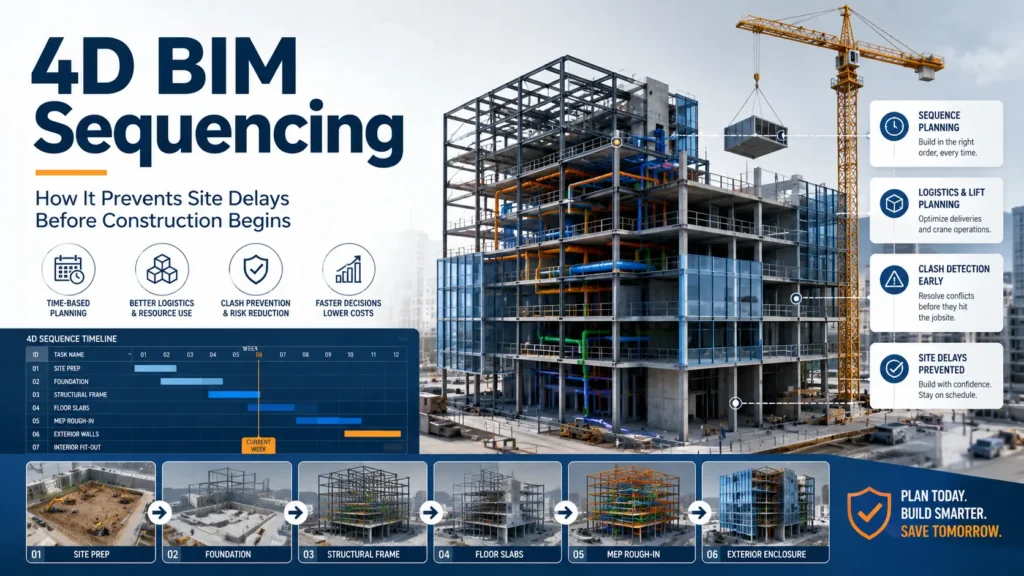
4D BIM scheduling takes the clash away from the construction site and into the virtual world. Through the connection of 3D BIM modeling to the scheduling process, the construction team can review the whole construction process in advance and identify every single problem, chokepoint, and interdependency.
What Is 4D BIM?
BIM dimensions refer to the layers of information added to a 3D model beyond geometry. The dimensions are:
- 3D – geometry, spatial relationships, and clash detection
- 4D – 3D model + time (construction programme and sequencing)
- 5D – 4D model + cost, including quantities, cost planning, procurement, and construction estimating services
- 6D – 5D model + sustainability data (energy, carbon, materials)
- 7D – 6D model + facility management data (asset information, maintenance)
4D BIM is the addition of the time dimension to a coordinated 3D model. The construction process model includes structural elements, MEP systems, architectural elements, and temporary facilities. The team connects each element to a specific activity or task within the construction programme. This creates a model that is able to produce an animation, which depicts the construction sequence over time.
This is more than just a visualization tool. It is an analysis tool which highlights potential conflicts in sequencing, spatial interference, access restrictions, and program interdependencies.
How Does 4D BIM Sequencing Work? The Process Step By Step
Step 1 – Start With A Coordinated 3D BIM Model
4D sequencing begins with a coordinated BIM model at LOD 300 or higher. The model must be clash-free and sufficiently developed for construction planning purposes. Teams accurately model components that crews need to erect or construct, using the correct geometry and location. They may also include scaffolding, formwork, and temporary site hoardings.
For a detailed explanation of LOD levels and which is required for coordination, see our guide: BIM LOD levels explained.
Step 2 – Link The Model To The Construction Programme
The team imports the construction schedule, usually created in Primavera P6, Microsoft Project, or Asta PowerProject, into the 4D sequencing software. They then link model elements to programme activities. For example, they link a structural steel erection activity to the relevant steel elements in the model. Similarly, they link an MEP coordination activity to duct runs, pipework, and cable trays in the federated model.
For small projects, teams can link the model to the programme manually. For medium-sized projects, they can partially automate the process by using WBS coding for model elements.
Step 3 – Simulate and Review The Sequence
After connecting the model with the programme, the 4D scheduling software creates an animated visualization of the construction process. The process can be viewed in slow motion, both forward and backward, at any chosen point in time.
This review works like an advanced layer of clash detection services, helping teams identify two subcontractors working in the same area, obstacles blocking MEP installation, crane swing radius conflicts, and task sequences that create critical path bottlenecks.
Step 4 – Resolve Conflicts and Update The Programme
Each conflict detected during the course of the 4D simulation is solved through modification of the sequence of programmes, the spatial positioning or the method of construction. The model is adjusted, the programme is modified, and the simulation is run again. This process is repeated until all conflicts are removed from the programme.
Thus, the result is a construction programme that has been tested spatially, not only logically. The project team can rest assured that the programme will hold up in three-dimensional reality, not just in theory.
Step 5 – Use The 4D Model Throughout The Project
A 4D model is not a one-time pre-construction deliverable. It is used throughout the project for progress monitoring (comparing actual vs planned construction sequence), subcontractor coordination meetings, client and stakeholder briefings, logistics planning updates, and programme recovery planning when delays occur.
4D BIM Sequencing vs Traditional Construction Planning
The table below compares 4D BIM sequencing against traditional programme-based planning across eight criteria.
| Criterion | Traditional Programme (Gantt / 2D) | 4D BIM Sequencing |
|---|---|---|
| Sequence Visualization | Text-based Gantt chart – no spatial context | 3D model animated by a programme – visually shows what is being built and when |
| Space Conflicts | Identified reactively on site when two trades arrive in the same zone | Identified proactively in the model – resolved before construction begins |
| Stakeholder Communication | Requires reading and interpreting programme documents | Animated sequence video – accessible to all stakeholders, including non-technical |
| Trade Coordination | Coordination meetings with 2D drawings – spatial conflicts are often missed | Virtual construction walkthrough – all trades can see their sequence spatially |
| Progress Monitoring | Activity status updated manually in the spreadsheet or programme software | Model elements updated to reflect actual vs planned – visual progress tracking |
| Logistics Planning | Site logistics planned on paper or a 2D site plan | Equipment positioning, crane movements, and access routes modelled in 4D |
| Risk Identification | Risks identified through manual programme review | Risks visible in the animated sequence – bottlenecks and critical path highlighted |
| Constructability Review | Separate constructability review meetings | Constructability issues visible during 4D simulation – no separate process needed |
How 4D BIM Sequencing Prevents Site Delays – The Specific Mechanisms
1. Workspace Conflict Resolution Before Construction
The most immediate cause of site delays in multi-trade construction is workspace conflict: two subcontractors needing to work in the same zone at the same time. In a traditional programme, teams manage these conflicts through coordination meetings and programme logic, but without proper BIM coordination services, spatial conflicts in three dimensions remain difficult to detect in a Gantt chart.
In a 4D simulation, workspace conflicts become visible as overlapping animated activities in the same model zone. They can be identified, quantified, and resolved before any trade mobilizes on site. This is particularly valuable on projects with dense MEP installations in ceiling voids and plant rooms, where the number of trades working in proximity is high.
2. Constructability Issues Identified Before Work Begins
Some construction sequences are physically impossible, not because of a scheduling error but because the geometry of the build creates an access or installation sequence problem that is not visible in 2D drawings.
A common example: a mechanical plant room requires large equipment to be installed through an opening that will be closed by structural work scheduled earlier in the programme. In a traditional programme review, this dependency is easy to miss. In a 4D simulation, the animated sequence makes it immediately visible because you can see the structural opening closing before the equipment enters. This gives project teams another layer of clash detection services, where they can identify not only physical clashes but also sequence and access conflicts before site work begins.
Research finding: The systematic review of 69 peer-reviewed articles on 4D BIM on ScienceDirect (2025) revealed that the most common advantages cited in academic research literature were improved construction scheduling, better communication among all stakeholders involved, and timely conflict management. The review found 57 distinct documented benefits of 4D BIM across ten thematic categories.
3. Logistics Planning and Crane Management
Site logistics, crane positions, delivery routes, temporary access roads, hoarding and exclusion zones are traditionally planned on 2D site plans. The relationship between logistics and the 3D construction sequence is difficult to visualize without accurate BIM modeling services and a properly linked 4D model.
In a 4D simulation, crane sweep radii can be modelled and animated, delivery routes can be checked against the active construction sequence, and exclusion zones can be validated against programme activities. Logistics conflicts that would cause multi-day delays on site are resolved in pre-construction.
4. Critical Path Clarity and Programme Optimization
A 4D model makes the critical path visible in three dimensions. Rather than reading a text-based programme to identify which activities are on the critical path, the project team can see visually which construction sequences cannot be delayed without affecting the overall programme.
This visibility supports programme optimization: identifying opportunities to overlap activities, compress sequences, and accelerate the critical path without creating spatial conflicts. Projects that use 4D BIM for programme optimization consistently achieve shorter construction programmes than equivalent projects planned traditionally.
5. Subcontractor Coordination and Trade Sequencing
4D simulations are the most effective tool for communicating complex multi-trade sequences to subcontractors. Rather than distributing programme documents that require interpretation, the principal contractor can combine construction documentation services with 4D sequencing to show each trade its sequence, workspace, and dependencies in an animated model.
This makes the coordination problems that lead to delays easier to understand: transactions delivered out of order, lack of space, and blockages from other tasks. Subcontractors who have seen their schedule through 4D before mobilization are more prepared and create fewer disruptions to the program.
6. Progress Monitoring and Delay Management
Once construction begins, the 4D model serves as a baseline against which actual progress can be monitored. Model elements are updated to reflect what has actually been built, creating a visual comparison of actual versus planned construction sequence.
In case of delay, the 4D tool is applied to determine the consequences for the critical path and recovery actions. And what has to be expedited? Which trades need to be resequenced? What resources are required to recover the programme? These queries are addressed graphically using the 4D tool, making advanced BIM services valuable for delay recovery, trade resequencing, and programme control.
Which Construction Projects Can Most Benefit From 4D BIM Sequencing?
4D sequencing delivers the greatest value on projects where programme complexity is high, multiple trades work concurrently, and the cost of sequence conflicts on site is high.
| Project Type | Why 4D Sequencing Matters | The Most Common Issue 4D Prevents |
|---|---|---|
| Commercial High-Rise | Multi-floor programme with concurrent trade packages – sequence conflicts are high-risk and costly | Two trades are scheduled for the same floor zone simultaneously, causing stoppages |
| Industrial & Manufacturing | Process piping, mechanical, and structural work overlap in constrained spaces | MEP installation sequence blocked by structural steel not yet erected |
| Healthcare | Phased construction in occupied buildings – sequence and access are safety-critical | Construction activity disrupting clinical zones during active healthcare operations |
| Data Center | Power, cooling, and network infrastructure in tight ceiling and raised floor zones | Dense MEP installation sequence conflicts in constrained ceiling voids |
| Infrastructure / Civil | Multi-phase projects with complex dependencies – road closures, utility diversions, phased handover | Phase handover dates were missed due to sequencing conflicts discovered late in the programme |
| Residential Development | Multiple blocks or phases built concurrently – shared infrastructure coordination | Shared utilities and access routes blocked by earlier-phase construction activity |
| Logistics & Warehousing | Building with large spans, with coordinated MEP and fit-out – crane and access plans essential | Clashes between crane positioning and earlier phases of structure and MEP erection |
What Software Is Used For 4D BIM Sequencing?
Autodesk Navisworks
Navisworks is considered to be the most commonly adopted 4D sequencing software within commercial and industrial construction projects. It connects elements within the model to the activities in the program obtained from either Primavera P6, Microsoft Project, or any other project management tool. Navisworks Timeliner creates animations of construction schedules and 4D video simulations that can be shown to stakeholders. It is also the very same software that is used in clash detection.
Synchro (Bentley)
Synchro is the specialist 4D sequencing tool most commonly used on large infrastructure, civil, and public sector projects. It offers more advanced programme integration and animation capabilities than Navisworks and is widely used by Tier 1 contractors on complex projects. Synchro works together with Primavera P6 and allows for more detailed modelling of resources and logistics compared to Navisworks.
Autodesk Construction Cloud (ACC) / BIM 360
When it comes to cloud-based 4D coordination, ACC combines model data with programme information in a collaborative setting where all project participants have access to the 4D sequence. This is increasingly used on large projects where multiple parties need to view and contribute to the sequencing process.
4D BIM Sequencing and MEP Coordination – The Most Critical Combination
The highest-value application of 4D BIM on commercial and industrial projects is the combination of MEP coordination services and 4D sequencing.
MEP coordination resolves spatial conflicts between systems at LOD 350. 4D sequencing then validates that the resolved MEP installation sequence is achievable, and that each trade has the access, workspace, and programme window it needs.
Without 4D sequencing, however, MEP coordination will result in a model free from any clashes; however, the installation sequence would still be impossible, physically speaking. There will be no issues concerning their clashes regarding space. However, their installation sequence will cause access problems once the contractors start working at the construction site.
With 4D sequencing, the installation sequence is validated in the model before any trade mobilizes. Every spatial conflict and access problem is identified and resolved in pre-construction, where it costs a fraction of what it costs on site.
To know more about MEP BIM Coordination and its interaction with 4D Sequencing, visit our article: BIM modeling for MEP coordination.
Accessing 4D BIM Sequencing Without Building In-House Capability
The sequencing process for 4D BIM is a blend of skills which cannot be easily maintained in-house: namely, BIM coordination skills, experience in construction planning, and skills in software such as Navisworks and Synchro, as well as integration with other scheduling software.
Building such expertise within a contractor or developer organization permanently is not economically viable for most companies. Project demand for 4D sequencing is variable; not every project justifies the investment, and carrying specialist 4D resources through quieter periods creates overhead without return.
Offshore BIM coordination services that include 4D sequencing provide access to this capability on a project basis, at offshore rates, with the flexibility to scale with your pipeline. The same experts who deliver your federated model and perform clash detection for your project can continue to perform 4D sequencing, ensuring that your clash-free model is also sequence conflict-free.
Add 4D Sequencing To Your Pre-Construction Workflow
Optimar Precon offers 4D sequencing as a component of our comprehensive pre-construction process, which includes federated model creation, clash detection, MEP coordination, and construction sequence verification, all conducted by offshore professionals specializing in BIM coordination. Contact us today to learn more about how we can help you with your upcoming projects.
FAQs
4D BIM sequencing is the process of linking a 3D BIM model to a construction programme or schedule to create an animated simulation of the construction sequence over time. There is an assignment of each modelling component to a programme task such that the members of the development team know what needs to be developed and in which sequence, even before the development process commences. The effect is to reveal scheduling conflicts, workplace issues, and logistical constraints, among other critical aspects, in a simulated environment.
3D BIM refers to the three-dimensional model of a building, which not only involves geometrical and spatial information but also includes building systems. In the case of 4D BIM, an extra dimension of time is added. Every component of the model is associated with an activity in the programme, hence allowing the animation of the construction process.
Autodesk Navisworks and Synchro by Bentley are the two most frequently employed software for BIM 4D sequence development. Autodesk Navisworks is an industry-standard software utilized on commercial and industrial projects and interoperates with Primavera P6 and MS Project; Synchro is a 4D software solution tailored for huge infrastructure/civil works. ACC is another alternative for cloud-based collaboration 4D.
4D BIM prevents construction delays by making sequencing problems visible before construction begins. Conflicts in workspace (having two trades operating in the same area at the same time), conflicts in constructability (being unable to install equipment due to prior operations), logistical conflicts (clashes in crane locations and delivery pathways), and conflicts in critical path schedules all appear in the 4D model. Every conflict solved through pre-construction reduces the risk of future delays or disruptions in construction. Studies reveal that 4D BIM enhances project scheduling, especially for multi-trade projects.
4D BIM links a 3D model to the construction programme (time). 5D BIM includes an additional dimension for costs: model components are connected with cost information, allowing for real-time cost forecasting, quantity takeoffs, and budgeting through the model. 4D supports programme planning and sequencing. 5D supports cost management and procurement. Both dimensions are typically developed from the same coordinated 3D model and are often used together on complex commercial and infrastructure projects.
4D sequencing delivers the greatest return on projects where programme complexity is high, and the cost of sequence conflicts on site is high: commercial high-rise, healthcare, data centres, industrial facilities, infrastructure, and large residential developments. On simpler projects with limited trade overlap, the investment in 4D sequencing may not be justified. As a general rule, if a project has three or more trades working concurrently in the same spatial zone, 4D sequencing is worth the investment.
4D BIM augments and verifies the existing method of scheduling instead of replacing it. In order to prepare the project schedule, conventional scheduling software is used, such as Primavera P6, Microsoft Project, and Asta Powerproject. 4D BIM introduces another spatial dimension to the process by linking all tasks to those corresponding components within the model to allow a 3D check of these components. Both approaches can supplement each other in order to obtain the most successful results.