
BIM Clash Detection Services
Optimar Precon provides BIM Clash Detection Services for architectural, structural and MEP models, helping project teams identify hard clashes, soft clashes, clearance issues and coordination conflicts in federated BIM environments.
Our BIM specialists review model interfaces, group coordination issues and prepare structured clash information for design review, coordination meetings and subsequent model updates.
What Do BIM Clash Detection Services Review?
BIM Clash Detection Services review coordinated model information to identify physical conflicts, clearance concerns and discipline interfaces across architectural, structural and MEP systems.
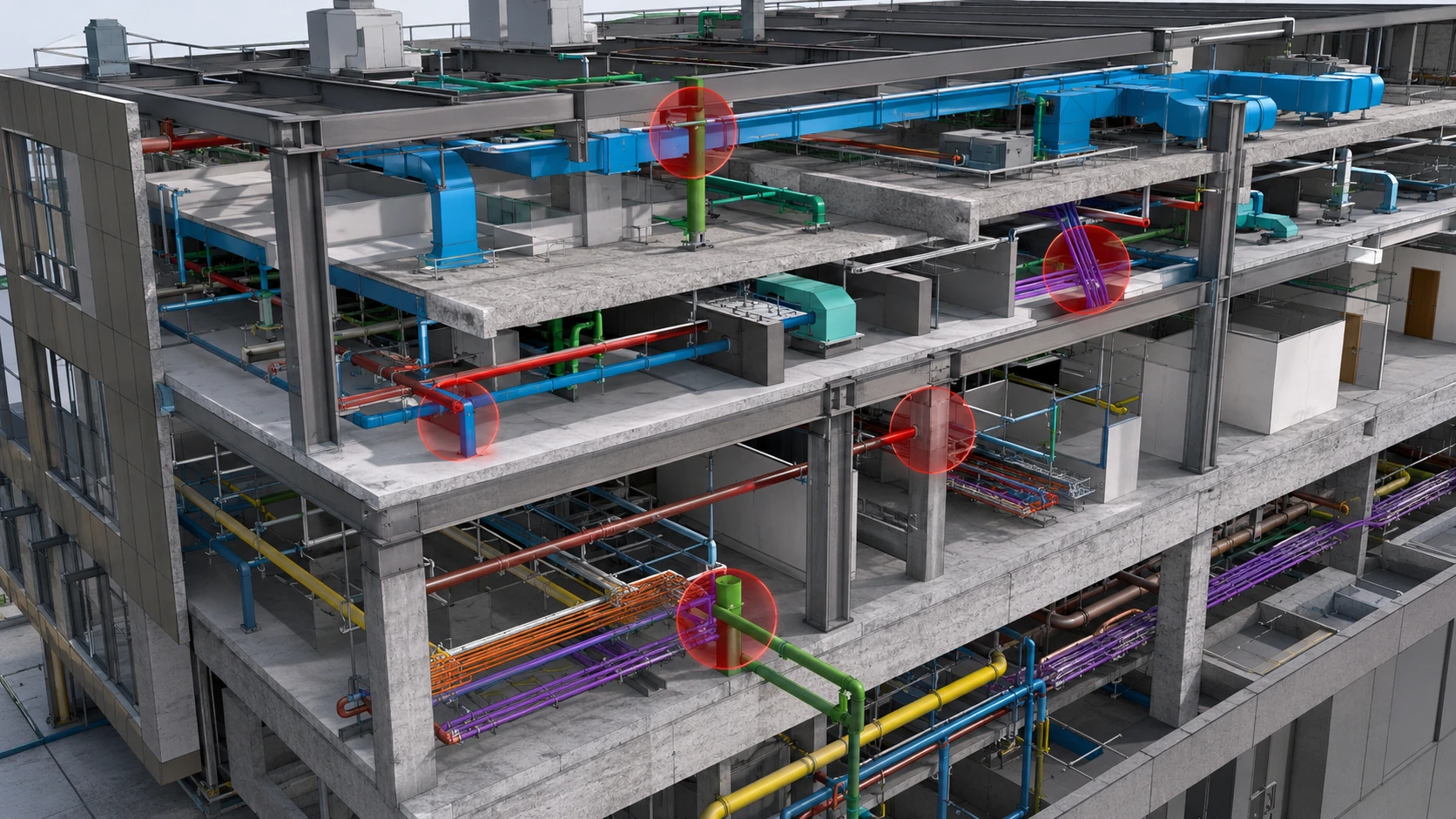
Hard, Soft and Clearance Clash Detection
Clash tests should be configured around the project disciplines, model maturity, defined tolerances and required access zones rather than treating every model intersection as the same type of issue.
Physical overlaps where two model elements occupy the same space.
Spacing or tolerance concerns between nearby model elements.
Conflicts affecting required access or maintenance zones.
Where Do Coordination Clashes Commonly Occur?
Clash review focuses on interfaces between disciplines and systems where geometry, routing, access zones or structural elements share the same project space.
Architecture vs Structure
Review walls, slabs, beams, columns, openings and architectural elements for model-interface conflicts.
MEP vs Structure
Review ducts, pipes, conduits and cable trays against beams, slabs, columns and structural openings.
MEP vs Architecture
Check building services against ceilings, walls, rooms, shafts, doors and architectural zones.
MEP vs MEP
Coordinate HVAC, plumbing, electrical and fire-protection systems where routes share congested spaces.
Equipment Clearances
Review equipment access, maintenance zones and service clearances around plant and technical equipment.
Shafts & Ceiling Spaces
Review dense vertical and horizontal service zones where multiple trades compete for limited space.
What Can a Clash Record Include?
The reporting structure can be configured around the coordination workflow and information required by the project team.
Test rules and tolerances should reflect the project scope so useful model relationships are not treated as issues.
Clash review depends on the geometry, discipline separation and model information available in the submitted files.
Grouping issues by discipline, severity and location helps coordination teams review model conflicts systematically.
Have federated BIM models ready for review?
Send your Revit, IFC or Navisworks files with the disciplines and coordination scope you want reviewed.
How Our BIM Clash Detection Process Works
Our BIM Clash Detection Services follow a structured workflow from model collection and federated-model setup through clash testing, issue reporting, model updates and final coordination review.
What Should You Send for Clash Detection?
Send the latest available discipline models together with relevant coordination information and defined review requirements.
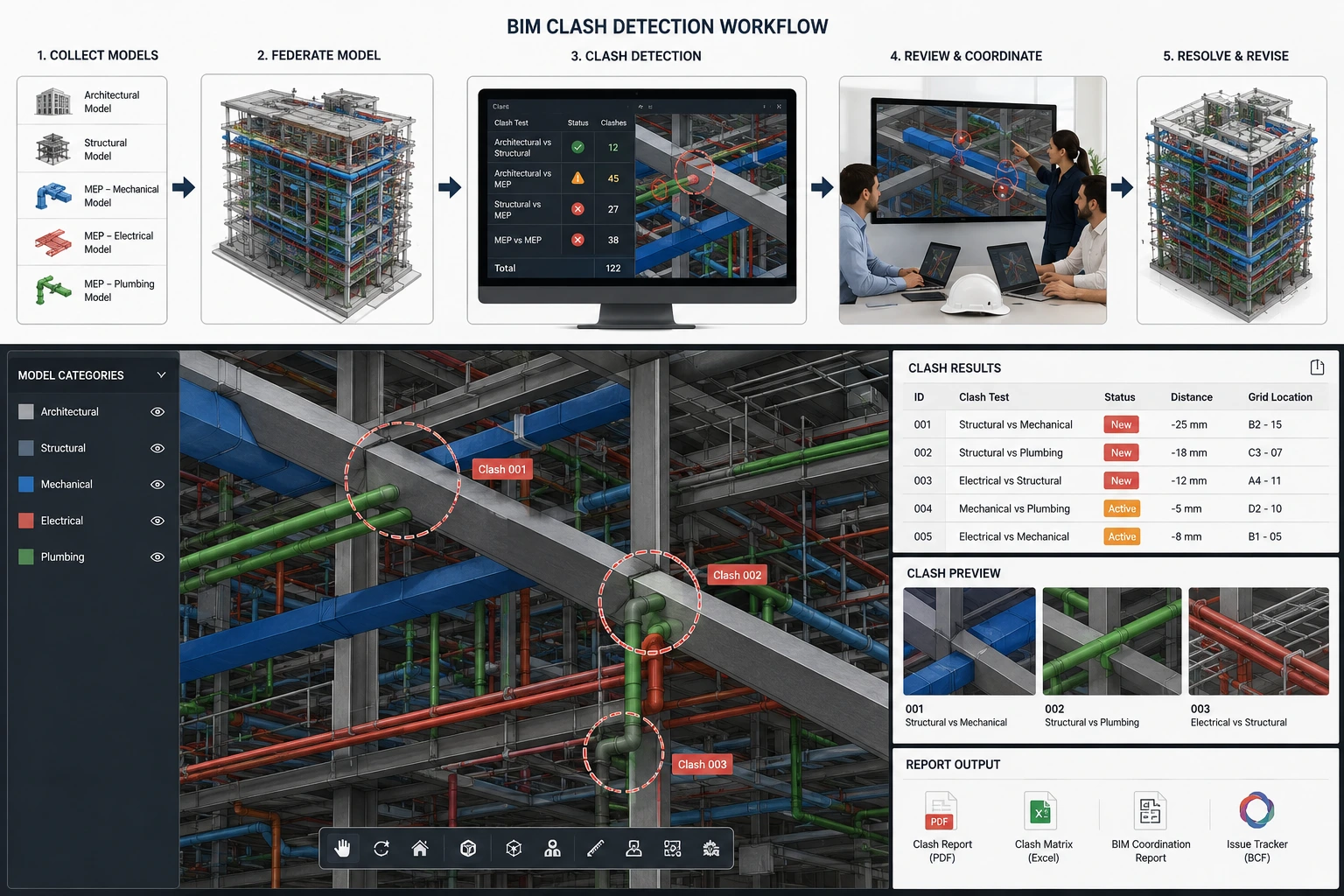
See Model Conflicts in Context
A federated model allows coordination teams to review each clash in relation to the surrounding structure, equipment and building services.
- MEP versus structure review
- Duct, pipe and cable-tray conflicts
- Equipment and maintenance clearances
- Shaft and ceiling-space coordination
- Navisworks viewpoints and issue records
From Model Collection to Clash Closeout Review
The workflow organizes model information, clash tests and issue records so coordination teams can review conflicts in a structured sequence.
Model Collection
Review the supplied Revit, IFC, Navisworks and discipline files together with the required coordination scope.
Federated Model Setup
Architectural, structural and MEP models are assembled in a shared coordination environment for review.
Clash Test Configuration
Define model pairs, hard-clash rules, clearance requirements, tolerances and system-specific tests.
Issue Detection & Grouping
Detected issues are reviewed and grouped by discipline, system, location, clash type and priority.
Clash Report Delivery
Prepare agreed clash records with issue IDs, viewpoints, screenshots, locations and coordination notes.
Revised Model Review
After model changes, revised files can be reviewed again to check the status of previously identified issues.
Define the Test Matrix Before Running Clash Detection
A structured test matrix helps separate meaningful coordination issues from acceptable model relationships.
What Can the Coordination Package Include?
Deliverables can be configured around the project’s coordination platform, reporting requirements and issue-review workflow.
Structured records of identified coordination issues.
Saved model views linked to individual coordination issues.
Visual references showing identified model conflicts.
Trackable lists of issues, disciplines and review status.
Model-coordination information prepared for compatible workflows.
Follow-up review of updated models against identified issues.
What Do We Review Before Issuing Clash Reports?
Quality review focuses on the defined clash scope, model setup and clarity of the reported issues.
Clash detection should use the latest available discipline models for the coordination review cycle.
Project teams should define relevant clearances and tolerances before soft-clash testing begins.
Revised-model reviews should reference the updated files and previously recorded coordination issues.
Ready to review your federated BIM models?
Send your latest discipline models and coordination requirements for clash detection scope review.
BIM Clash Detection Support for Multi-Discipline Coordination
Our BIM team combines model review, clash-test configuration and structured reporting to support architectural, structural and MEP coordination workflows.

Why Project Teams Use Optimar Precon for Clash Detection
Our specialists review model interfaces and organise coordination issues around the supplied project scope rather than simply exporting raw clash-test results.
Where Clash Detection Requires Detailed Review
Dense service routes, restricted access and multiple discipline interfaces often require more focused model review.
Tools Used Across BIM Coordination Workflows
Software and file workflows are selected according to the submitted models, coordination requirements and agreed reporting process.
Need clash detection for your project?
Send your latest models and coordination scope for project-specific review.
BIM Clash Detection Services FAQs
Answers to common questions about BIM clash detection, federated-model review, hard and soft clashes, project inputs, reporting and revised-model coordination.
What is BIM clash detection?
BIM clash detection is the process of reviewing federated building models to identify physical overlaps, spacing concerns, clearance issues and coordination conflicts between project disciplines.
What is the difference between hard, soft and clearance clashes?
A hard clash is a physical overlap between model elements. A soft clash involves an agreed spacing or tolerance requirement, while a clearance clash affects required access, maintenance or operational space.
Which models can be included in clash detection?
The coordination scope can include architectural, structural, HVAC, plumbing, electrical, fire-protection and other discipline models supplied for federated review.
What files should we send for clash detection?
Common inputs include Revit files, IFC models, NWC or NWD files, discipline models, coordination notes, relevant clash rules and any defined tolerances or clearance requirements.
When should BIM clash detection be performed?
Clash detection is typically performed during model coordination and repeated after meaningful discipline-model updates so new and previously identified issues can be reviewed.
What information can a clash report include?
A project-specific clash report can include issue IDs, screenshots, Navisworks viewpoints, locations, clash categories, discipline references, priority information and coordination notes.
Can you review revised BIM models after coordination updates?
Yes. Revised discipline or federated models can be reviewed against previously identified issues to check their current status and identify additional coordination concerns.
Which software is used for BIM clash detection?
The workflow can use Navisworks Manage, Autodesk Revit, BIM 360 or Autodesk Construction Cloud, IFC workflows, NWC/NWD files and compatible issue-tracking formats according to project requirements.

Review Coordination Conflicts in Model Context
Clash detection allows architectural, structural and MEP systems to be reviewed together so identified issues can be understood within the wider coordination environment.
Ready to Review Your BIM Models for Coordination Clashes?
Send your Revit, IFC or Navisworks models together with the disciplines, test requirements and coordination scope you want reviewed.